Synchronization
Synchronization is a core feature that enables data transfer between different systems and APIs. Here's how it works:
Overview
- Synchronizations define how data should be synchronized between a source and target system
- Each synchronization has a source configuration (where to get data from) and target configuration (where to send data to)
- The synchronization process handles pagination, data mapping, and maintaining sync state
Key Components
Source Configuration
- Defines where to fetch data from (API endpoint, database etc)
- Specifies how to map source data to target format (incomming data)
- Specifies how to locate objects in the response using resultsPosition:
_root: Uses the entire response body as the objects array- Dot notation (e.g.
data.items): Extracts objects from a nested path - Common keys (
items,result,results): Automatically checks these standard locations - Custom path: Specify any JSON path to locate the objects
- Configures pagination settings (paginationQuery)
- Can include conditions to filter which objects to sync using JSON Logic
- Source type can be set to API or other supported types
- Source ID mapping allows specifying position of IDs in source objects
- Optional endpoint configuration for fetching data
- usesPagination: configure this field if you know this source does not uses pagination or next endpoint. Use value "false". If this source uses next endpoint it will auto detect.
- Optional configuration of sub objects.
- (Optional) restrictDeletion: if set to true or 1, restricts the deletion of objects in the synchronization to objects of which the origin id was in the request to the source, to prevent deletion of objects when a specified set of objects is synchronized.
Related or sub objects
If you don't want mapped related- or sub- objects to duplicate and do want sub objects to have their own contracts you need to let the synchronization know. You can configure this under the source configuration of a synchronization.
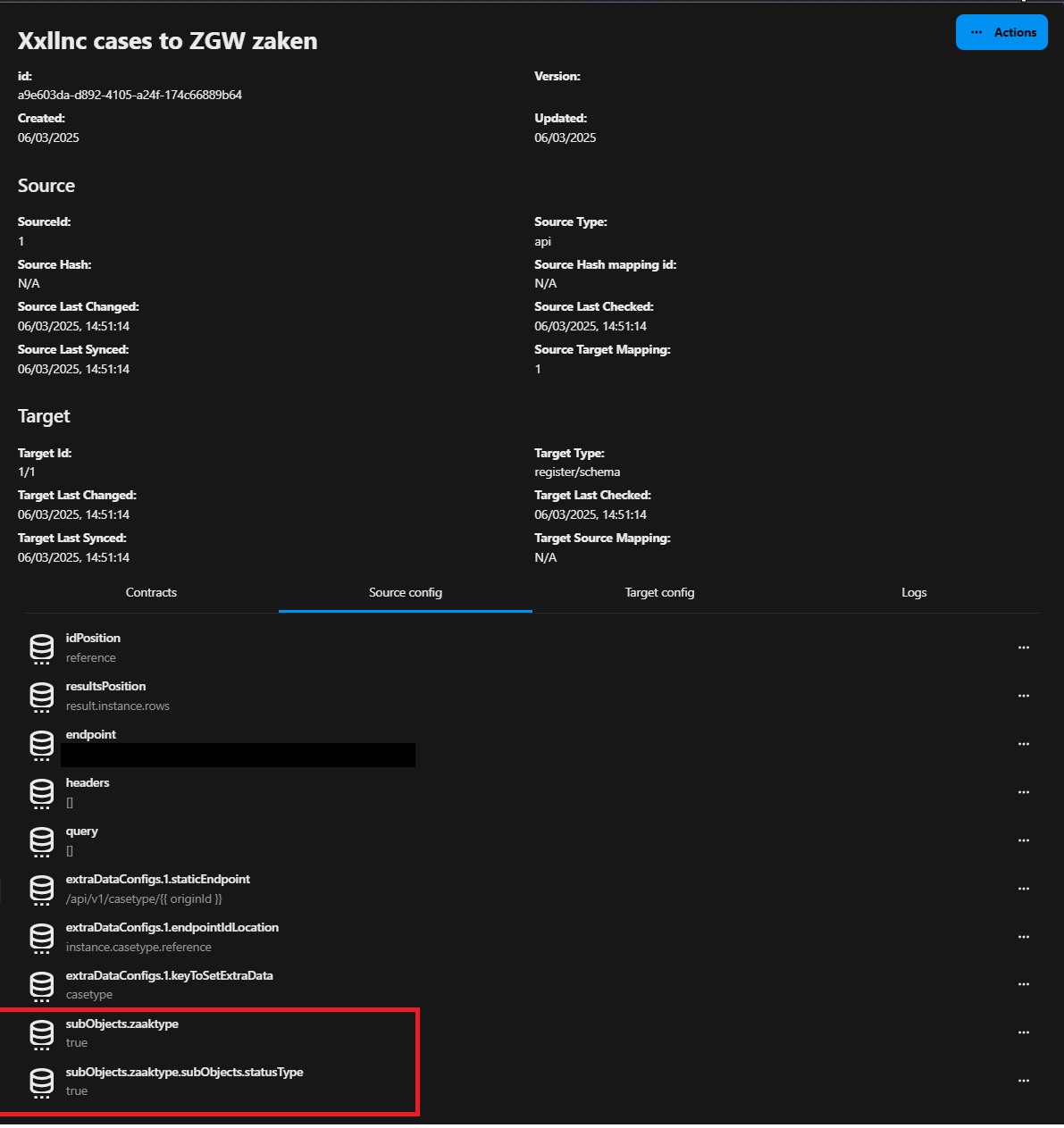
The synchronization know knows we need to find and update a existing contract for zaaktype and the zaaktype its own sub object statustype. The contract can find the related object and update that object instead of duplicating objects each time the synchronization has ran.
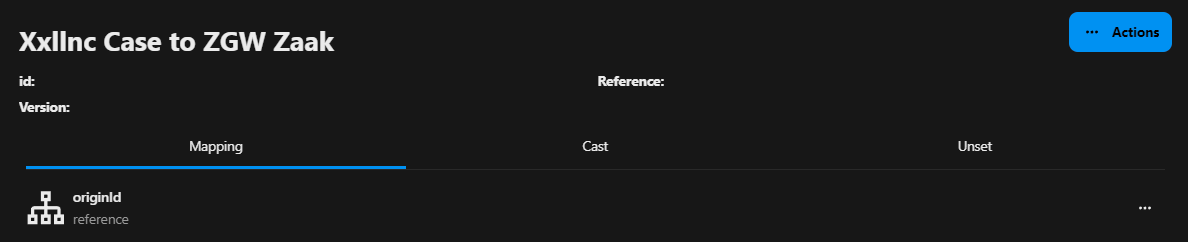
Also make sure you first map a originId in the mapping of a sub object so the code can find this object and update it instead of duplicate it.
Target Configuration
- Defines where to send synchronized data
- Specifies how to map target data to source format (outgoing data)
- Handles create/update/delete operations
- Target type can be Register/Schema or other supported types
- Target ID and schema selection for Register/Schema targets
- Target source mapping for data transformations
idInRequestBodyis a config option u can use when the id of the object in the target is not managed by itself but needs to be given with the request. Set the id to the required key in a mapping and configureidInRequestBodyto that key so we set the targetId of the contract to that id.
Synchronization Contracts
- Tracks the sync state for each individual object
- Stores origin ID and target ID mappings
- Maintains hashes to detect changes
- Logs synchronization events and errors
Process Flow
- Fetch all objects from source system with pagination
- Determining if an object has changed
- Create/update synchronization contracts for each object
- Transform data according to mapping rules
- Write objects to target system (POST/PUT/DELETE)
- Update contract status and hashes
- Handle any follow-up synchronizations
Determining if an object has changed
The synchronization service prevents unnecessary updates and code execution by checking the following conditions:
- The origin hash matches the stored hash in the synchronization contract (indicating the source object hasn't changed)
- The synchronization configuration hasn't been updated since the last check (synchronization.updated < contract.sourceLastChecked)
- If a source target mapping exists, verify it hasn't been updated since the last check (mapping.updated < contract.sourceLastChecked)
- The target ID and hash exist in the synchronization contract (object hasn't been removed from target system)
- The force parameter is false (if true, the update will proceed regardless of other conditions)
If all these conditions are met, the synchronization service will skip updating the object since no changes are needed. This optimization prevents unnecessary API calls and processing.
This procces might be overridden by the user by setting the force option to true. In that case the synchronization service will update the target object regardless of whether it has changed or not.
Error Handling
- Rate limiting detection and backoff
- Logging of failed operations
- Contract state tracking for retry attempts
The synchronization system provides a robust way to keep data in sync across different systems while maintaining state and handling errors gracefully.
Form Configuration
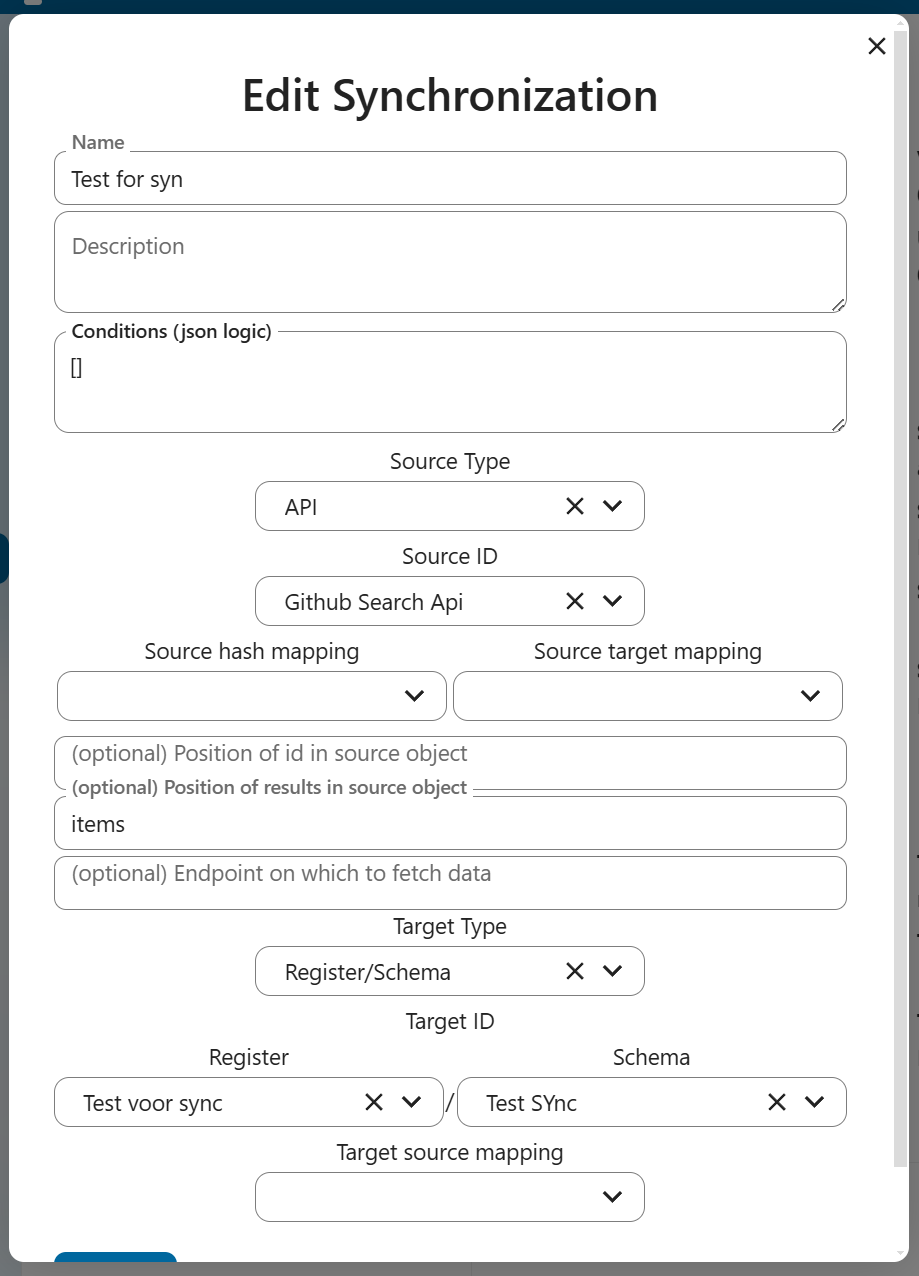
The synchronization form allows configuring:
- Name: Descriptive name for the synchronization
- Description: Optional details about the synchronization
- Conditions: JSON Logic conditions for filtering objects
- Source Configuration:
- Source Type: API or other supported types
- Source ID: Selection of configured source
- Source hash mapping: Hash configuration
- Source target mapping: Data mapping rules
- Position of ID in source object (optional)
- Position of results in source object (optional)
- Custom endpoint for data fetching (optional)
- Target Configuration:
- Target Type: Register/Schema or other types
- Target ID: Selection of target system
- Register and Schema selection for Register/Schema targets
- Target source mapping: Data transformation rules
- Test sync option to validate configuration
XML
All XML files are first parsed to a json object before being processed. During this parings all element atributes are added to the @attributes property of the element Resulting in a clean json object. Lets take a look at the XML example, and the json result that it will produce.
<?xml version="1.0" encoding="utf-8"?>
<model xmlns="http://www.opengroup.org/xsd/archimate/3.0/" xmlns:xsi="http://www.w3.org/2001/XMLSchema-instance" xsi:schemaLocation="http://www.opengroup.org/xsd/archimate/3.0/ http://www.opengroup.org/xsd/archimate/3.1/archimate3_Diagram.xsd http://dublincore.org/schemas/xmls/qdc/2008/02/11/dc.xsd" identifier="id-d47463497ef83403bedb663bff370727">
  <name xml:lang="nl">GEMMA</name>
  <documentation xml:lang="nl">De GEMeentelijk Model Architectuur (GEMMA) bevat een blauwdruk van de gemeente en haar informatievoorziening. De GEMMA kan worden gebruikt als basis voor de projectmodellen</documentation>
  <elements>
    <element identifier="id-009fa62f25844aa3a87d252bf2b6bb0c" xsi:type="Capability">
      <name xml:lang="nl">Publiceren en gebruiken van informatie over datadiensten</name>
      <documentation xml:lang="nl">Dienstenafnemers moeten in online catalogi kunnen opvragen welke diensten, met welke kenmerken, door dienstenaanbieder worden aangeboden.
Onder andere ontwikkelaars hebben baat bij informatie over beschikbare diensten en de vereisten voor het gebruik van de dienst (bijv. specificatie van een dienst conform de OAS-standaard).</documentation>
      <properties>
        <property propertyDefinitionRef="propid-1">
          <value xml:lang="nl">Thema-architectuur Common Ground</value>
        </property>
        <property propertyDefinitionRef="propid-2">
          <value xml:lang="nl">a10869bf-a895-4a66-8f81-a4f96c58cc3e</value>
        </property>
      </properties>
    </element>
    <element identifier="id-096b6619f4cd4164a0572b04ef082c0f" xsi:type="Capability">
      <name xml:lang="nl">Bieden van 'regie op gegevens' aan burgers en bedrijven</name>
      <documentation xml:lang="nl">Burgers en bedrijven moet zeggenschap worden geboden over hun persoonlijke gegevens. Ze moeten o.a. in staat worden gesteld om te weten welke gegevens de overheid over hen vastlegt en gebruikt, persoonlijke gegevens (digitaal) te delen, eenmalig te verstrekken, de eigen gegevens in te zien, te controleren en waar nodig te (laten) corrigeren,in te zien welke gegevens worden en zijn uitgewisseld.</documentation>
      <properties>
        <property propertyDefinitionRef="propid-1">
          <value xml:lang="nl">Thema-architectuur Common Ground</value>
        </property>
        <property propertyDefinitionRef="propid-2">
          <value xml:lang="nl">6868ab87-f5db-40b7-aba6-17b1ba477d54</value>
        </property>
      </properties>
    </element>
  </elements>
</model>
{
  "@attributes": {
    "identifier": "id-d47463497ef83403bedb663bff370727"
  },
  "name": "GEMMA",
  "documentation": "De GEMeentelijk Model Architectuur (GEMMA) bevat een blauwdruk van de gemeente en haar informatievoorziening. De GEMMA kan worden gebruikt als basis voor de projectmodellen",
  "elements": {
    "element": [
      {
        "@attributes": {
          "identifier": "id-009fa62f25844aa3a87d252bf2b6bb0c",
          "xsi:type": "Capability"
        },
        "name": "Publiceren en gebruiken van informatie over datadiensten",
        "documentation": "Dienstenafnemers moeten in online catalogi kunnen opvragen welke diensten, met welke kenmerken, door dienstenaanbieder worden aangeboden. \nOnder andere ontwikkelaars hebben baat bij informatie over beschikbare diensten en de vereisten voor het gebruik van de dienst (bijv. specificatie van een dienst conform de OAS-standaard).",
        "properties": {
          "property": [
            {
              "@attributes": {
                "propertyDefinitionRef": "propid-1"
              },
              "value": "Thema-architectuur Common Ground"
            },
            {
              "@attributes": {
                "propertyDefinitionRef": "propid-2"
              },
              "value": "a10869bf-a895-4a66-8f81-a4f96c58cc3e"
            }
          ]
        }
      },
      {
        "@attributes": {
          "identifier": "id-096b6619f4cd4164a0572b04ef082c0f",
          "xsi:type": "Capability"
        },
        "name": "Bieden van 'regie op gegevens' aan burgers en bedrijven",
        "documentation": "Burgers en bedrijven moet zeggenschap worden geboden over hun persoonlijke gegevens. Ze moeten o.a. in staat worden gesteld om te weten welke gegevens de overheid over hen vastlegt en gebruikt, persoonlijke gegevens (digitaal) te delen, eenmalig te verstrekken, de eigen gegevens in te zien, te controleren en waar nodig te (laten) corrigeren,in te zien welke gegevens worden en zijn uitgewisseld.",
        "properties": {
          "property": [
            {
              "@attributes": {
                "propertyDefinitionRef": "propid-1"
              },
              "value": "Thema-architectuur Common Ground"
            },
            {
              "@attributes": {
                "propertyDefinitionRef": "propid-2"
              },
              "value": "6868ab87-f5db-40b7-aba6-17b1ba477d54"
            }
          ]
        }
      }
    ]
  }
}
So in this case we have a json object with an @attributes property. This property is used to store the identifier of the element. The name property is used to store the name of the element. And the properties property is used to store the properties of the element.
That means that we can configure the psoition of the id in the source mapping as @attributes.identifier and the position of result within the source object as elements.element.
Oke that setsup geting the data from the source, but how does the data get to the destination? Wel ugly is the answer, we have to map the data to the destination object. Right now the above code would result in the following object:
{
  "@attributes": {
    "identifier": "id-8576c90ac5104cf8ade8acadf2764432"
  },
  "name": "IngeschrevenPersoon",
  "documentation": "Een INGEZETENE of NIET-INGEZETENE",
  "properties": {
    "property": [
      {
        "@attributes": {
          "propertyDefinitionRef": "propid-6"
        },
        "value": "{AF9534B0-7CBD-4061-9276-A7B6698B383A}"
      },
      {
        "@attributes": {
          "propertyDefinitionRef": "propid-8"
        },
        "value": "Class"
      },
      {
        "@attributes": {
          "propertyDefinitionRef": "propid-7"
        },
        "value": "10122024-112046"
      },
      {
        "@attributes": {
          "propertyDefinitionRef": "propid-9"
        },
        "value": "\"ggm-\" properties worden beheerd in het GGM informatiemodel"
      },
      {
        "@attributes": {
          "propertyDefinitionRef": "propid-15"
        },
        "value": "Ingezetene, Client, Leerling, Ouder Of Verzorger"
      },
      {
        "@attributes": {
          "propertyDefinitionRef": "propid-2"
        },
        "value": "e1371e07-969e-4a34-be81-0a23ffd541dd"
      },
      {
        "@attributes": {
          "propertyDefinitionRef": "propid-10"
        },
        "value": "https://gemmaonline.nl/index.php/GEMMA/id-e1371e07-969e-4a34-be81-0a23ffd541dd"
      }
    ]
  },
  "id": "faea7cdb-fe32-42fb-bbd4-98c3744ef333"
}
So lets create a mapping for this, like:
{
  "identifier": "@attributes.identifier",
  "name": "name",
  "documentation": "documentation",
  "properties": "{ {% for property in properties.property  %}\"{{property['@attributes']['propertyDefinitionRef']}}\":\"{{property['value']}}\"{% if not loop.last %},{% endif %}{% endfor %} }"
}
Lets not forget that this will output the properties like
{
  "properties": "{ \"propid-6\":\"{AF9534B0-7CBD-4061-9276-A7B6698B383A}\",\"propid-8\":\"Class\",\"propid-7\":\"10122024-112046\",\"propid-9\":\""ggm-" properties worden beheerd in het GGM informatiemodel\",\"propid-15\":\"Ingezetene, Client, Leerling, Ouder Of Verzorger\",\"propid-2\":\"e1371e07-969e-4a34-be81-0a23ffd541dd\",\"propid-10\":\"https://gemmaonline.nl/index.php/GEMMA/id-e1371e07-969e-4a34-be81-0a23ffd541dd\" }"
}
So in the mapping we must add a cast to turn that into a json object.
{
  "properties": "jsonToArray"
}
And that will result in the following object:
{
  "properties": {
    "propid-6": "{AF9534B0-7CBD-4061-9276-A7B6698B383A}",
But we want to map the data to the following object:

```json
{
  "identifier": "id-8576c90ac5104cf8ade8acadf2764432",
  "name": "IngeschrevenPersoon",
  "documentation": "Een INGEZETENE of NIET-INGEZETENE",
  "properties": {
    "propid-6": "{AF9534B0-7CBD-4061-9276-A7B6698B383A}",
    "propid-8": "Class",
    "propid-7": "10122024-112046",
    "propid-9": "\"ggm-\" properties worden beheerd in het GGM informatiemodel",
    "propid-15": "Ingezetene, Client, Leerling, Ouder Of Verzorger",
    "propid-2": "e1371e07-969e-4a34-be81-0a23ffd541dd",
    "propid-10": "https://gemmaonline.nl/index.php/GEMMA/id-e1371e07-969e-4a34-be81-0a23ffd541dd"
  }
}
Now of course propeties like propid-6 are not very readable, so we can rename them to something more readable later using a translation table.